
From 1 July 2026, all STP submissions to the ATO must include a Software Service ID (SSID). This identifier uniquely identifies both your business and your payroll software to strengthen authentication and authorisation processes. You can learn more about this change on the ATO website.
Each employer will need to add their unique SSID to the ATO’s Access Manager and authorise MessageXchange (using our ABN) to send STP files to the ATO on their behalf. This link explains how to do this. If you have any trouble updating Access Manager, please get in touch with the ATO. They’ll be able to help. As per our previous communications, from the 1st of April 2026, we we'll begin to include the SSIDs in STP submissions. To avoid any issues when we send STP files to the ATO, please ensure you update the ATO's Access Manager prior to this date.
FAQs
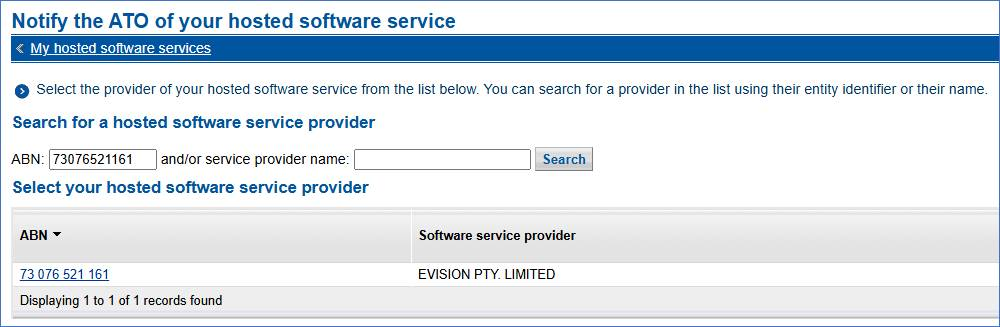
What do I search for when authorising MessageXchange?
MessageXchange ABN: 73 076 521 161 (EVISION PTY. LIMITED)
The SSID I have inputted is showing as incorrect in Access Manager, what do I do?
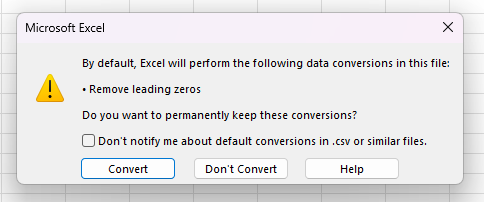
If we send you SSID information via a password protected file, when you open the file in Microsoft Excel it can format the number incorrectly. This can remove a number from your SSID and making it incorrect. To avoid this, follow these steps:
- Open the file
- When prompted to "remove leading zeros", select the "Don't convert" button. The prompt will show like below:
- Input the SSID provided into Access Manager. If you still have issues, get in touch with our support team.
What happens if these changes aren’t made?
Your STP files won’t be accepted by the ATO unless all steps are completed on time. If we submit an STP file containing an SSID before it’s been added to the ATO’s Access Manager, the file will be rejected.